
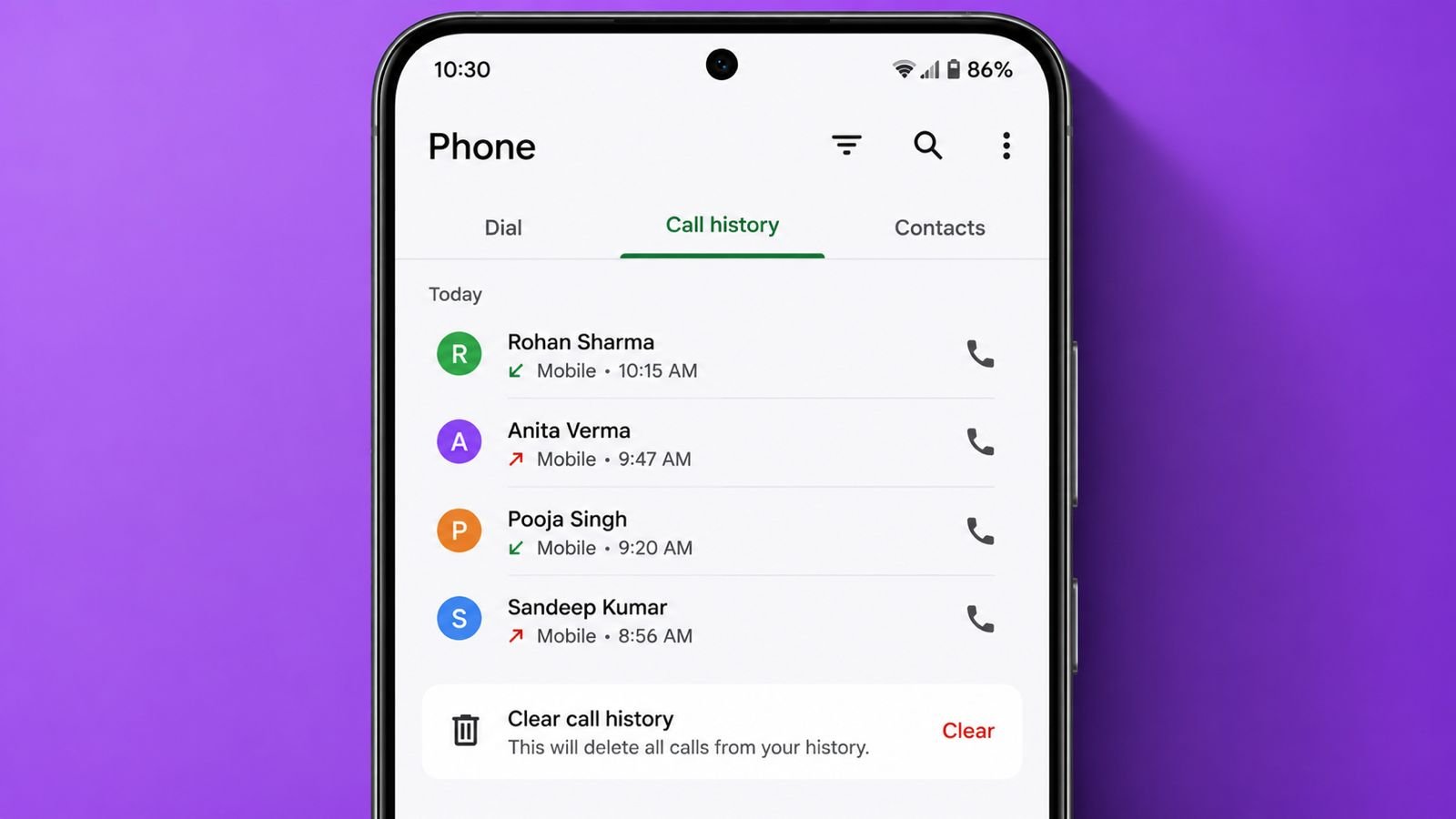

Call history is an important feature on every Android smartphone. It keeps a record of all incoming, outgoing, and missed calls. Whenever you make or receive a call, the details are automatically stored in the Phone app.
This feature helps users track their communication activity. However, there are times when clearing call history becomes necessary. For example, you may want to protect your privacy, remove unnecessary records, or keep your phone organized.
In this guide, you will learn what call history is, why you should clear it, and the different ways to delete call records on Android devices.
What is Call History?
Call history, also known as a call log, is a list of all phone calls made and received on your device. It contains useful information such as:
- Contact name or phone number
- Date and time of the call
- Call duration
- Incoming, outgoing, or missed call status
Android phones automatically save this information so users can quickly review their recent calls.
Why Should You Clear Call History?
There are several reasons why users choose to remove call records from their phones.
Privacy Protection
First, clearing call history helps protect your personal information. If someone else uses your phone, they will not be able to view your recent calls.
Remove Unwanted Records
Over time, hundreds of call entries can accumulate. As a result, the call log may become cluttered and difficult to manage.
Better Organization
A clean call history makes it easier to find important calls. In addition, it helps keep your Phone app organized.
Device Maintenance
Although call logs use very little storage space, removing old records can help maintain a cleaner and more organized device.
Method 1: Delete a Single Call Record
If you want to remove only one specific call from your history, follow these steps.
Step 1: Open the Phone app on your Android device.
Step 2: Tap on the “Recents” or “Call History” section.
Step 3: Locate the call entry you want to remove.
Step 4: Press and hold the call record.
Step 5: Select the “Delete” or “Remove” option.
Step 6: Confirm the deletion when prompted.
After that, the selected call record will be removed from your call history.
Method 2: Delete Multiple Call Records
Sometimes, you may want to remove several call entries at once. In that case, follow these steps.
Step 1: Open the Phone app.
Step 2: Go to the Call History section.
Step 3: Tap the three-dot menu in the top-right corner.
Step 4: Choose “Edit” or “Select.”
Step 5: Select all call records you want to remove.
Step 6: Tap the Delete button.
Once completed, the selected entries will disappear from your call log.
Method 3: Clear Entire Call History
If you prefer to remove all call records from your Android phone, use the following method.
Step 1: Open the Phone app.
Step 2: Navigate to the Recents or Call History section.
Step 3: Tap the three-dot menu.
Step 4: Choose “Clear Call History,” “Delete Call Log,” or “Delete All Calls.”
Step 5: Confirm your action.
Within a few seconds, all call records will be deleted from your device.
Get Call Details
Device-Specific Instructions
Different Android brands may use slightly different menu names. However, the overall process remains similar.
Samsung Phones
- Open the Phone app.
- Tap Recents.
- Open the menu.
- Select Delete.
- Tap Select All.
- Confirm deletion.
Xiaomi, Redmi, and POCO Phones
- Open the Phone app.
- Go to Call History.
- Tap Menu.
- Select Clear Call History.
- Confirm deletion.
Realme, Oppo, and OnePlus Phones
- Open the Phone app.
- Open Call Log.
- Tap the menu icon.
- Select Delete Records.
- Choose individual records or delete all.
Can Deleted Call History Be Recovered?
Many users wonder whether deleted call records can be restored. In most cases, recovery is difficult. However, it may be possible under certain conditions.
Recovery may work if:
- Google Backup is enabled
- Cloud backup services are active
- Data recovery software is used
Even then, successful recovery is not guaranteed.
Important Things to Remember
Before deleting your call history, keep the following points in mind.
Deleting call history does not:
- Remove contacts from your phone
- Delete WhatsApp chats
- Remove saved phone numbers
- Affect your SIM card data
Instead, it only removes records stored in the call log.
Common Issues
Delete Option Not Available
Some Android versions use different menu layouts. Therefore, the delete option may appear in a different location. Updating the Phone app can often solve this issue.
Call History Reappears
Sometimes, deleted call records return automatically. This usually happens because cloud synchronization or backup restoration is enabled.
Different Android Versions
Not all Android phones look the same. As a result, menu names and settings may vary depending on the device manufacturer and Android version.
Frequently Asked Questions
Does deleting call history delete contacts?
No. Deleting call history only removes call records. Your contacts remain unchanged.
Does clearing call history affect WhatsApp calls?
No. WhatsApp call records are managed separately within the WhatsApp application.
Can I recover deleted call logs?
Recovery may be possible through backups or recovery tools. However, success is not guaranteed.
Will deleting call history free up storage?
Call logs consume very little storage. Therefore, deleting them will not significantly increase available space.
Conclusion
Clearing call history on Android is a simple and effective way to protect your privacy and organize your phone. Whether you want to delete a single call, remove multiple entries, or clear your entire call log, Android provides quick and convenient options.
By following the methods explained in this guide, you can easily manage your call records and keep your device organized. In addition, understanding how call history works helps you maintain better control over your personal information and communication records.
Nice